 The Flying Kite Studios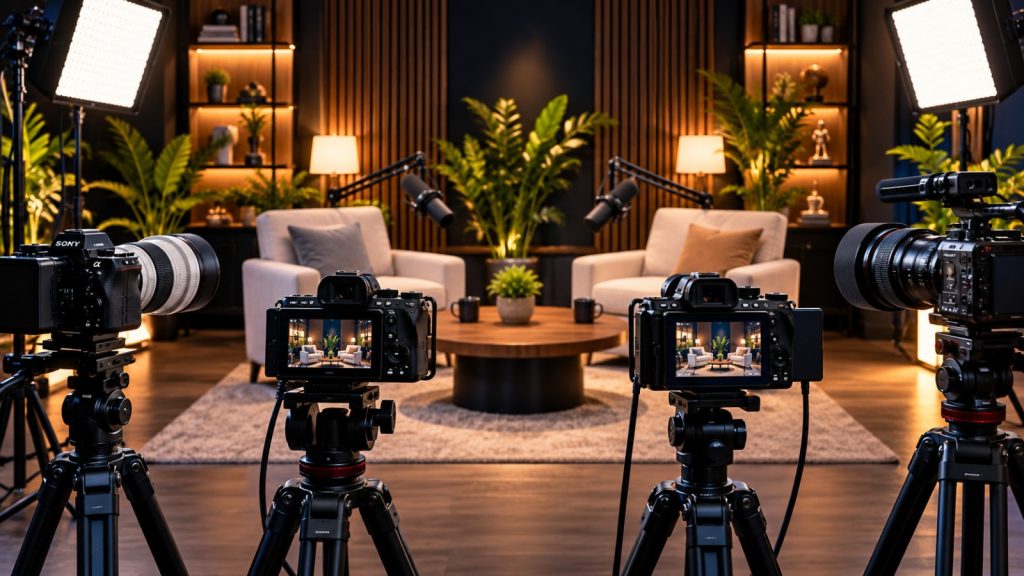
A podcast is no longer just about great conversations and clear audio. Today, video podcasts have become an important part of content creation, allowing creators to publish full episodes on YouTube while also turning conversations into short-form clips for Instagram, LinkedIn, and other social platforms.
Because of this, choosing the right camera can make a significant difference to the overall quality of your podcast.
However, finding the best cameras to shoot podcast in studios is not simply about choosing the camera with the highest resolution. Instead, you need to consider autofocus, low-light performance, recording reliability, lens selection, connectivity, overheating, and how easily the camera can fit into a multi-camera studio setup.
In this guide, we will explore some of the best camera options for podcast studios and explain what you should consider before investing in your setup.
Why Does the Camera Matter in a Podcast Studio?
First of all, a professional-looking podcast needs more than a good microphone.
The camera determines how your audience sees the host, guest, studio environment, expressions, and overall visual identity of the show. Therefore, a good camera can make a podcast look more polished and engaging.
Moreover, podcast recordings often last for an hour or longer. As a result, a camera used in a studio needs to handle extended recording sessions reliably.
A good podcast camera should ideally provide:
- Excellent image quality
- Reliable autofocus
- Good low-light performance
- 4K video recording
- Clean HDMI output
- External microphone connectivity
- Headphone monitoring
- Reliable long-duration recording
- Flexible lens options
- Easy integration with multiple cameras
Additionally, if your podcast studio produces short-form clips, a camera with strong image quality gives you more flexibility when cropping and reframing footage.
What Should You Look for in a Podcast Camera?
Before choosing a camera, it is important to understand which specifications actually matter for podcast production.
1. 4K Video Recording
First, 4K should be one of the main considerations when selecting a podcast camera.
Although you may publish your final podcast in 1080p, recording in 4K gives you additional room for cropping, reframing, and creating vertical clips.
For example, a wide two-person shot can be reframed into a closer shot during editing without sacrificing as much image quality.
Therefore, 4K is particularly useful for studios producing both long-form episodes and social media content.
2. Reliable Autofocus
Next, autofocus is extremely important.
Podcast hosts and guests naturally move while talking. They may lean forward, turn toward another person, or gesture with their hands. Consequently, the camera needs to maintain focus without constantly hunting.
Modern Sony, Canon, and Panasonic cameras offer sophisticated autofocus systems. The Sony FX30, for example, combines movie-focused autofocus capabilities with an APS-C sensor and supports 4K recording at frame rates up to 120p.
3. Low-Light Performance
Furthermore, studio lighting is not always bright.
Many podcast studios intentionally use a darker, cinematic environment with practical lights, LED panels, and accent lighting. In such situations, a camera with good low-light performance can produce a cleaner image with less visible noise.
However, remember that good lighting is still essential. Even an expensive camera cannot completely compensate for poor lighting.
4. Long Recording Reliability
Podcast episodes can easily run for one or two hours. Therefore, recording reliability is more important than having a camera that looks impressive on paper.
A camera designed for video production, particularly one with effective heat management, can be a better choice for a busy podcast studio.
For example, the Sony FX30 includes active cooling and is designed around extended video production, making it particularly suitable for studio environments.
5. HDMI and Studio Connectivity
In a professional podcast studio, cameras are often connected to a switcher, monitor, recorder, or streaming system.
Consequently, connectivity becomes an important consideration.
A full-size HDMI connection can be especially useful in a permanent studio environment because it is generally more robust for repeated cabling than smaller HDMI connectors.
6. Audio Connectivity
Although podcast studios typically record audio separately using professional microphones and an audio interface or mixer, camera audio connections can still be useful.
For instance, a camera may provide a reference audio track that makes synchronizing external audio much easier during post-production.
That said, your primary podcast audio should generally be recorded through a dedicated professional audio chain rather than relying solely on the camera’s built-in microphone.
Best Cameras to Shoot Podcast in Studios
Now that we understand what matters, let’s look at some of the strongest options for studio podcast production.
1. Sony FX30 – Best Overall for Professional Podcast Studios
The Sony FX30 is one of the strongest choices for a dedicated podcast studio.
It uses an APS-C/Super 35 sensor and is designed specifically around video production. Furthermore, it offers 10-bit recording options, 4K recording up to 120p, advanced autofocus, dual card slots, and active cooling.
These features make it particularly suitable for studios that record long podcast sessions regularly.
Why Choose the Sony FX30?
- Excellent video-focused design
- 4K recording up to 120p
- Strong subject and eye autofocus
- Active cooling for extended recording
- Dual media-card slots
- Full-size HDMI
- External microphone and headphone connections
- Sony E-mount lens ecosystem
Additionally, the FX30 works particularly well in a multi-camera podcast environment because several identical bodies can be used to maintain consistent image quality and color.
Best for: Professional podcast studios, production companies, and creators who want a dedicated video-production camera.
2. Panasonic Lumix GH7 – Best for Production Flexibility
The Panasonic Lumix GH7 is another excellent choice for podcast studios.
It is particularly appealing to production teams that want flexibility beyond traditional 4K recording. The camera supports a wide range of video formats and frame rates, while its Micro Four Thirds system provides access to a large selection of relatively compact lenses.
Moreover, the GH7 is designed with serious video production in mind and includes advanced recording and monitoring features.
Why Choose the Panasonic GH7?
- Advanced video recording options
- 4K and higher-resolution recording modes
- Strong production workflow
- Compact lens ecosystem
- Excellent monitoring capabilities
- Useful for multicamera productions
Consequently, the GH7 can be a great option for studios that want one camera system capable of handling podcasts, interviews, promotional videos, and other content.
Best for: Production-focused studios and creators who want extensive video features.
3. Panasonic Lumix S5IIX – Best Full-Frame Option
If you want a full-frame look, the Panasonic Lumix S5IIX deserves consideration.
A full-frame sensor can provide excellent low-light performance and greater control over depth of field. Therefore, it can be particularly attractive for cinematic podcast setups.
The S5IIX also offers a strong video feature set and is well suited to creators who want their podcast cameras to perform double duty for other professional video projects.
Why Choose the S5IIX?
- Full-frame sensor
- Strong low-light capability
- Professional video features
- Excellent image quality
- Flexible lens options
- Suitable for studio and commercial video
However, full-frame systems can increase the overall cost because lenses and accessories can become more expensive.
Best for: Premium podcast studios and production teams that also shoot commercial video.
4. Canon EOS R6 Mark II – Great Full-Frame Hybrid
The Canon EOS R6 Mark II is another strong choice, especially for creators who want a camera that works well for both photography and video.
It offers full-frame imaging, strong autofocus, and 4K video capabilities. Additionally, Canon’s color rendering can be appealing for creators who want attractive skin tones with relatively little correction.
The R6 Mark II supports 4K recording up to 60p and includes microphone and headphone connections, making it practical for studio video production.
Why Choose the Canon R6 Mark II?
- Full-frame image quality
- Excellent autofocus
- Attractive skin tones
- 4K 60p video
- Strong low-light performance
- Good hybrid photo/video capabilities
Best for: Podcast hosts and studios that also need a capable photography and video camera.
5. Sony ZV-E10 II – Best for Smaller Podcast Studios
Not every podcast studio needs a cinema camera.
For smaller studios, independent creators, and people starting their first video podcast, the Sony ZV-E10 II can be a practical alternative.
It combines an APS-C sensor with a compact body and creator-focused features. Furthermore, Sony’s autofocus system makes it relatively easy to keep subjects sharp during conversations.
Therefore, it can be a sensible option when the budget needs to cover other important equipment such as microphones, lighting, tripods, and acoustic treatment.
Best for: Beginners, solo creators, and smaller podcast studios.
Camera Comparison for Podcast Studios
| Camera | Sensor | Best For | Key Strength |
|---|---|---|---|
| Sony FX30 | APS-C / Super 35 | Professional studios | Video-focused design & reliability |
| Panasonic GH7 | Micro Four Thirds | Production studios | Video flexibility |
| Panasonic S5IIX | Full Frame | Premium studios | Low-light & cinematic look |
| Canon R6 Mark II | Full Frame | Hybrid creators | Autofocus & image quality |
| Sony ZV-E10 II | APS-C | Beginners | Compact & affordable |
Ultimately, there is no single camera that is perfect for every podcast studio. Instead, the right choice depends on your budget, room size, production workflow, and the type of content you plan to create.
How Many Cameras Do You Need for a Podcast?
Interestingly, you do not always need an expensive multi-camera system to create a professional podcast.
A simple two-camera setup can already produce a polished result.
For example:
Camera 1: Wide shot of both host and guest
Camera 2: Close-up of the host or guest
For a more dynamic production, a three-camera setup can be even better:
Camera 1: Wide master shot
Camera 2: Host close-up
Camera 3: Guest close-up
As a result, editors can switch between different perspectives and keep the conversation visually engaging.
For larger podcast studios, four cameras may be useful when there are multiple guests or when the production team wants additional angles.
Don’t Forget the Lens
Choosing the camera body is only half of the equation.
In fact, the lens can have an enormous impact on how your podcast looks.
For a typical studio setup, a 24mm, 35mm, 50mm, or equivalent focal length can be useful depending on the room size, camera distance, and desired framing.
A wider lens is generally useful when the camera needs to be placed close to the participants. On the other hand, a longer focal length can create a more compressed and cinematic look when the studio provides enough space.
Therefore, always consider the complete camera-and-lens combination rather than buying a camera body alone.
Camera Settings for Podcast Recording
Once you have selected the right camera, proper settings can make your footage even better.
For a standard podcast, you can start with:
- Resolution: 4K
- Frame rate: 25fps or 30fps
- Shutter speed: Approximately double the frame rate
- Picture profile: Choose based on your editing workflow
- White balance: Keep consistent across all cameras
- Focus: Continuous autofocus or carefully controlled manual focus
- ISO: Keep as low as practical while maintaining proper exposure
Most importantly, keep the settings consistent across cameras.
Otherwise, you may end up with one camera producing noticeably warmer, darker, or sharper footage than another.
What About Audio?
Even though this article focuses on cameras, audio deserves special attention.
After all, viewers may tolerate average video quality for a few minutes, but poor audio can make them leave immediately.
Therefore, a professional podcast setup should typically include:
- Dynamic or condenser podcast microphones
- Mic stands or boom arms
- Audio interface or mixer
- Headphones
- Acoustic treatment
- Separate audio recording
- Backup recording where possible
Furthermore, recording audio separately provides more control during editing.
In other words, a great camera makes your podcast look professional, but great audio makes people want to keep listening.
Lighting Is Just as Important as the Camera
Even the best cameras to shoot podcast in studios will struggle to deliver a premium image if the lighting is poor.
Fortunately, you don’t necessarily need a huge lighting setup.
A basic three-light arrangement can work extremely well:
Key Light
The key light provides the primary illumination on the host or guest.
Fill Light
The fill light reduces harsh shadows and helps create a more balanced image.
Background Light
Finally, a background or practical light adds depth to the studio and helps separate the subjects from the background.
Additionally, colored accent lights, practical lamps, and studio signage can help establish a recognizable visual identity.
Take Away
Choosing the best cameras to shoot podcast in studios requires more than looking at megapixels or maximum video resolution.
Instead, consider the entire production workflow.
A professional podcast camera should provide dependable autofocus, excellent image quality, reliable long-duration recording, useful connectivity, and compatibility with the lenses and accessories you already use. Looking for studio in gurgaon for podcast shoot visit The Flying kite Studios.
For a dedicated professional studio, the Sony FX30 is a particularly compelling option because it combines video-focused features, reliable autofocus, active cooling, 4K recording, and studio-friendly connectivity.
Meanwhile, the Panasonic GH7 is attractive for production teams that prioritize recording flexibility, while the Panasonic S5IIX and Canon EOS R6 Mark II are strong choices for creators who prefer a full-frame workflow.
Finally, remember that the camera is only one part of the production.
Good lighting, professional microphones, acoustic treatment, thoughtful framing, and consistent camera settings all contribute to the final result. Therefore, rather than spending your entire budget on the most expensive camera available, build a balanced studio setup where every component works together.
That is ultimately what creates a podcast that not only sounds professional but also looks professional.